

API Security
Overview
Securing your integration with the Terra API protects your account, your users, and the Tripadvisor content you serve. This guide covers the mechanisms Terra provides and the practices every partner should follow.
Terra enforces security at several layers: TLS encryption in transit, API key authentication, per-account rate limits and daily quotas, endpoint authorization tied to your subscription, and an AWS WAF that filters malicious traffic before it reaches the application.
API key authentication
Every request to the Terra API must include a valid API key in the X-API-Key header. The key identifies your Terra account and determines which endpoints and content tiers you can access.
Header format
X-API-Key: YOUR_API_KEYInclude this header on every request. Requests without a valid key receive a
401 Unauthorizedresponse.
| Scenario | HTTP status | Text returned |
|---|---|---|
| API key missing from request | 401 | API key is not provided |
| API key not recognized | 401 | API key has not been found |
| API key disabled / account inactive | 401 | API key is not enabled |
| Key valid but endpoint not in subscription | 403 | API Key does not have access to endpoint |
The three 401 strings arrive in the detail field of the problem response. The 403 string arrives in message, not detail — if you are parsing error bodies, read both.
Do not embed your key in client-side code, public repositories, or URLs. Store it in environment variables or a secrets manager and transmit it only over HTTPS.
HTTPS and TLS encryption
All Terra API endpoints are served exclusively over HTTPS with TLS 1.2 or later. Plain-text HTTP requests are rejected, so your key and all request and response data are encrypted in transit.
Make sure your HTTP client validates the server certificate. Do not disable certificate verification in production, even while debugging.
Regenerating your API key
If you suspect your key has leaked, regenerate it immediately. Regenerating creates a new key and invalidates the old one.
Steps to regenerate
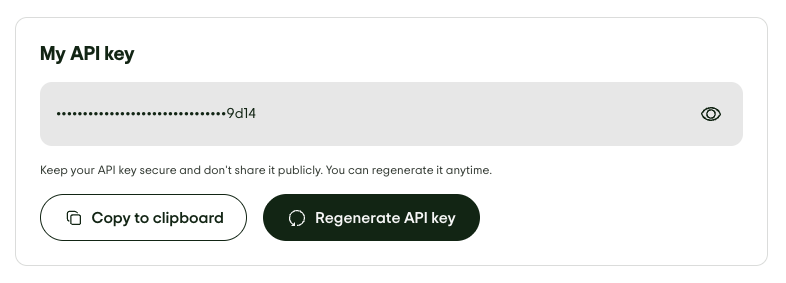
- Log in to your Terra Dashboard.
- Go to the Overview tab and find the "My API Key" card.
- Click the regenerate button. A new key is generated instantly.
- Copy the new key and update it everywhere it is used, including environment variables.
- Confirm your integration works with the new key before you consider the rotation complete.
Regenerating revokes the previous key instantly. Make sure you are ready to update every service that uses it before you start, and either plan for a brief interruption or coordinate the update across your systems.
Endpoint authorization
Your key does not grant access to every Terra endpoint — access follows your package and add-ons. Calling an endpoint outside your subscription returns 403 Forbidden.
See API Access and Limits for what each package authorizes and how to add access.
Updated 2 days ago